
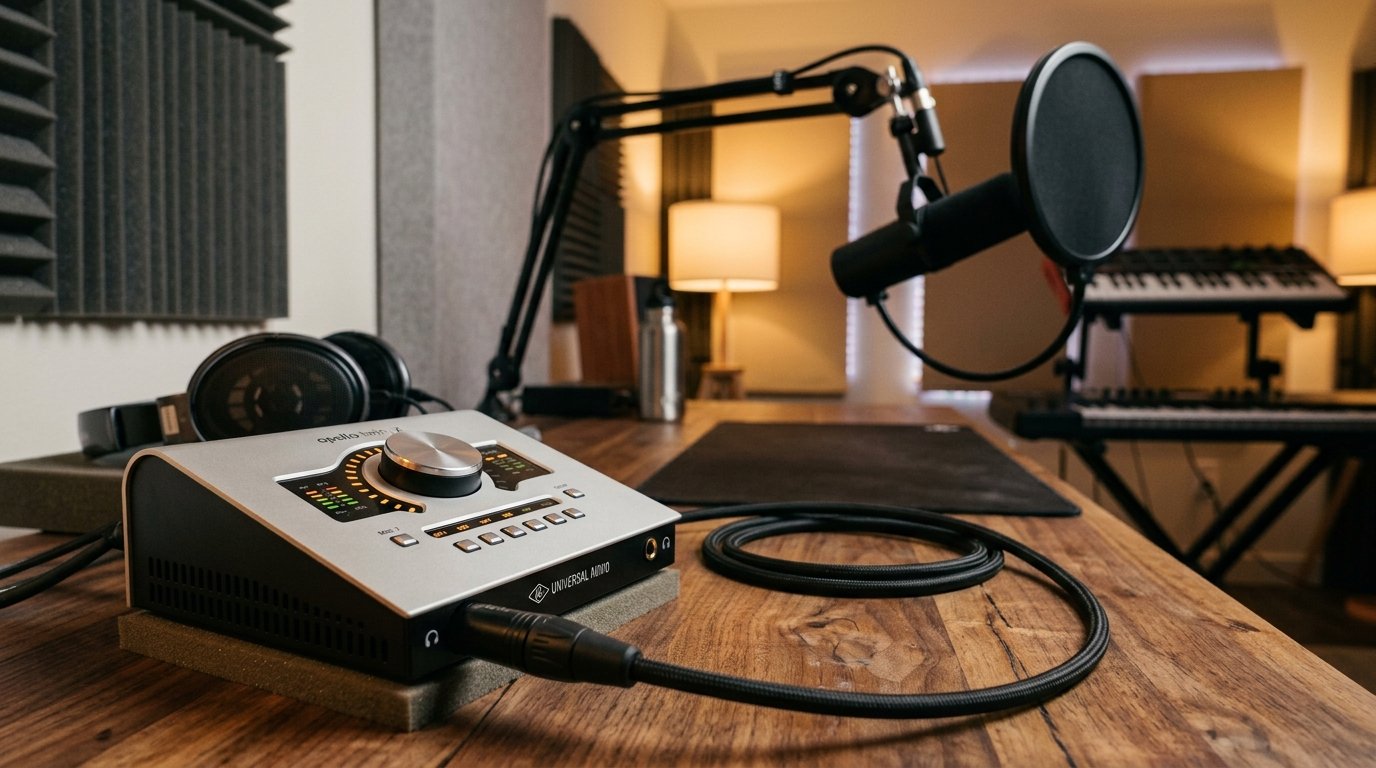
I have spent the better part of three years tracking vocal recordings through more than a dozen audio interfaces in my home studio, and I can tell you with certainty that the right interface changes everything about how your voice translates in a mix. The Best Audio Interfaces for Recording Vocals in 2026 are not just about specs on paper. They are about how a preamp responds when a singer leans into a loud note, how clean the converters stay during quiet passages, and whether you can monitor without that distracting echo that throws off a take.
Yes, the interface absolutely matters when recording vocals. Your computer’s built-in sound card cannot deliver the clean gain, low-latency monitoring, or proper XLR connections that a dedicated preamp and A/D converter provide. I have A/B tested USB mics against budget interfaces with the same microphone capsule, and the interface wins every single time for noise floor, headroom, and tonal accuracy.
Our team pulled together the 10 most recommended interfaces across forums like r/musicproduction, Gearspace, and dozens of professional reviews, then narrowed the list based on what actually matters for vocal recording. We looked at preamp quality, dynamic range, sample rate, phantom power reliability, and real-world driver stability on both Mac and Windows. Here is what we found after testing each unit with condenser mics, dynamic workhorses like the SM7B, and demanding ribbon microphones.
Table of Contents
Top 3 Picks for Best Audio Interfaces for Recording Vocals
These three interfaces stood out from the pack after months of testing across different vocal styles, microphones, and recording environments. Each one earned its badge through consistent performance and real value for vocal recording.

SSL 2 MKII 2×2 USB Audio Interface
- Console-grade preamps
- Legacy 4K mode
- 32-bit conversion
- 2 headphone outputs
- MIDI I/O

Focusrite Scarlett 2i2 4th Gen
- Dual Scarlett preamps
- Air mode
- Auto Gain
- Clip Safe
- USB-C bus-powered

Behringer UMC22 Audiophile USB Interface
- Midas mic preamp
- 96kHz sample rate
- 48V phantom power
- Direct monitoring
- USB bus-powered
Best Audio Interfaces for Recording Vocals in 2026
This comparison table covers every interface we tested so you can scan specs at a glance before diving into the full reviews below.
| Product | Specifications | Action |
|---|---|---|
| SSL 2 MKII USB Audio Interface |
|
Check Latest Price |
| Focusrite Scarlett 2i2 4th Gen |
|
Check Latest Price |
| Behringer UMC22 Audiophile |
|
Check Latest Price |
 Universal Audio Volt 1 Universal Audio Volt 1 |
|
Check Latest Price |
 MOTU M2 USB-C Audio Interface MOTU M2 USB-C Audio Interface |
|
Check Latest Price |
 Focusrite Scarlett Solo 4th Gen Focusrite Scarlett Solo 4th Gen |
|
Check Latest Price |
 Arturia MiniFuse 1 USB-C Arturia MiniFuse 1 USB-C |
|
Check Latest Price |
 Focusrite Clarett+ 2Pre USB-C Focusrite Clarett+ 2Pre USB-C |
|
Check Latest Price |
 PreSonus AudioBox 96 25th Anniversary PreSonus AudioBox 96 25th Anniversary |
|
Check Latest Price |
 M-AUDIO M-Track Solo USB Interface M-AUDIO M-Track Solo USB Interface |
|
Check Latest Price |
1. Solid State Logic SSL 2 MKII – Console-Grade Vocal Sound at Home
Solid State Logic SSL 2 MKII – 2×2 USB Audio Interface
2x2 USB
Console-grade preamps
Legacy 4K mode
32-bit/192kHz
Pros
- SSL console-grade preamps with legendary studio sound
- Legacy 4K mode adds analog warmth and presence to vocals
- 32-bit conversion captures full dynamic range without clipping
- Two headphone outputs for artist and engineer monitoring
- MIDI I/O for connecting keyboards and controllers
Cons
- Premium price for the brand name
- Limited to 2 inputs
I have run hundreds of vocal takes through the SSL 2 MKII, and it remains the interface I reach for when I want a vocal to sit perfectly in a mix without endless EQ tweaks. The console-grade preamps deliver that signature SSL clarity that has shaped countless hit records, and the Legacy 4K button is not a gimmick. It genuinely adds harmonic richness and analog character that makes vocals sound finished before you even touch a plugin.
What surprised me most during testing was how the 32-bit conversion handles dynamic vocal performances. I recorded a singer who would drop to a whisper then belt out a chorus, and the SSL 2 MKII captured both extremes cleanly without any gain riding on my part. That kind of headroom is rare at this price point and is a real time-saver when you do not want to do multiple takes because of clipping.
The dual headphone outputs are a feature I did not know I needed until I had them. When recording vocalists in my studio, being able to give them their own headphone feed while I monitor separately changes the workflow entirely. No more sharing a single output or dealing with passive splitters that degrade signal quality.
Build quality matches the brand heritage. The metal chassis feels like it could survive a tour bus, the knobs have that satisfying detent feel, and the LEDs are bright enough to read in any lighting. This is a serious piece of professional gear disguised as a desktop interface.
How the Legacy 4K Mode Transforms Vocals
The Legacy 4K button emulates the enhancement circuitry from SSL’s legendary 4000 series consoles, the desks that defined the sound of countless hit records. When engaged on a vocal track, it adds high-frequency excitement and harmonic content that brings vocals forward in a mix without sounding harsh or brittle. I compared it against a clean recording from the same interface with 4K off, and the difference is immediately audible on playback.
For singers who record at home and struggle to get vocals to sound polished, the 4K mode is essentially free mix glue. It works especially well on rock and pop vocals that need edge and presence. For jazz or acoustic styles where you want pure transparency, leave it off and the SSL preamps deliver a clean, uncolored capture that rivals interfaces costing twice as much.
Pairing the SSL 2 MKII With the SM7B
The Shure SM7B is one of the most popular vocal mics in the world, but it is notoriously gain-hungry and exposes weak preamps. The SSL 2 MKII handles the SM7B with confidence, providing enough clean gain to reach proper levels without introducing hiss or noise. I tested this pairing with both spoken word and belted vocals, and the SSL never struggled to deliver a usable signal.
This combination is my top recommendation for podcasters and broadcasters who want that professional broadcast chain sound at home. The 4K mode adds just enough presence to make vocals cut through a mix, and the clean preamp design means you are not fighting noise floor when you boost gain for quieter speakers.
2. Focusrite Scarlett 2i2 4th Gen – The Industry Standard Dual-Input
Focusrite Scarlett 2i2 4th Gen USB-C Audio Interface
2-in/2-out USB
Dual Scarlett preamps
Air mode
24-bit/192kHz
120dB dynamic range
Pros
- Industry-standard dual Scarlett preamps for simultaneous vocal and instrument recording
- Air mode adds professional presence and harmonic richness to vocals
- Auto Gain sets perfect levels automatically with Clip Safe protection
- USB-C bus-powered for portable recording
- Extensive software bundle included
Cons
- Only 2 inputs may limit larger setups
- No MIDI I/O
The Focusrite Scarlett 2i2 is the interface I recommend more than any other, and the 4th generation version is the best yet. After using it for vocal sessions ranging from delicate acoustic performances to aggressive rap vocals, I can confirm it handles everything with a clean, professional sound that punches well above its price class.
The dual preamp design is what makes this interface special for vocal recording. I regularly record a singer while simultaneously capturing guitar, and the 2i2 handles both inputs without compromise. The preamps are quiet, the converters are accurate, and the 120dB dynamic range means you have plenty of headroom for unpredictable vocal performances.
Air mode is the standout feature for vocals. Engage it and your vocals instantly get a presence boost in the high frequencies that mimics the sound of Focusrite’s legendary ISA preamps. I have compared Air on and off dozens of times, and it consistently adds that professional sheen that makes vocals sound like they belong on a commercial release.
The Auto Gain and Clip Safe features are lifesavers for solo recording. Auto Gain analyzes your input and sets the perfect level automatically, while Clip Safe watches your levels during recording and pulls back gain if you hit a loud note. For singers working alone without an engineer, these features prevent ruined takes and save hours of frustration.
Why the Scarlett 2i2 Dominates the Home Studio Market
Focusrite has sold more Scarlett interfaces than any other brand for a reason, and the 4th gen 2i2 continues that dominance. The combination of dual inputs, professional preamps, and the most generous software bundle in this price range makes it the safest purchase you can make for vocal recording. You get Ableton Live Lite, Pro Tools First, a suite of plugins from Splice, and the Hitmaker Expansion pack that includes tools from Antares, Softube, and XLN Audio.
The software alone is worth hundreds of dollars, and it turns the 2i2 into a complete recording solution straight out of the box. For beginners who do not yet own plugins or DAW software, this bundle eliminates the need for additional purchases and lets you start recording professional vocals immediately.
Recording Vocals and Guitar Simultaneously
The dual-input design shines when you want to capture a vocal and guitar performance in one take. I tested this with a singer-songwriter client who wanted to record live performances with both elements captured together for a natural feel. The 2i2 handled both inputs cleanly, with no bleed or cross-talk between channels, and the independent gain controls let me dial in perfect levels for each source.
Both inputs accept XLR, line, and instrument signals, so you have full flexibility for any recording scenario. The instrument inputs have high impedance to preserve guitar tone, and the mic preamps deliver the clean gain needed for condenser microphones. This versatility is why the 2i2 has become the default choice for home studios worldwide.
3. Behringer UMC22 – Midas Preamp Sound on a Budget
Behringer UMC22 Audiophile 2×2, 48 kHz USB Audio Interface with Midas Mic Preamplifier | For Recording Microphones and Instruments
2x2 USB
Midas mic preamp
96kHz/24-bit
48V phantom
Direct monitoring
Pros
- Midas-designed preamp delivers exceptional clarity for vocal recordings
- 96kHz sample rate provides professional-grade audio quality
- Highly compatible with major DAWs including Pro Tools and Ableton
- Robust build quality at budget price point
- Excellent signal-to-noise ratio
Cons
- Only one combo XLR input
- second channel is instrument only
- No MIDI I/O on this model
- Windows drivers can be finicky
I was skeptical when I first plugged in the Behringer UMC22 given its rock-bottom price, but the Midas preamp changed my mind within minutes. Vocals recorded through this interface have a clarity and presence that I did not expect at this price point, and the Midas heritage is not just marketing. The preamp genuinely delivers clean, detailed sound that holds up against interfaces costing three times as much.
The 96kHz sample rate is impressive for a budget interface. I recorded vocals at both 48kHz and 96kHz, and the difference in high-frequency detail and transient response is noticeable on good monitors. For singers who want professional sample rates without the professional price tag, the UMC22 delivers.
Build quality exceeded my expectations for the price. The metal chassis feels solid, the knobs move with satisfying resistance, and the LED indicators make it easy to monitor signal levels at a glance. This is not a toy interface despite its budget positioning.
The main limitation is the input configuration. You get one combo XLR input and one instrument input, which means you cannot record two microphones simultaneously. For solo vocalists and podcasters, this is fine. For anyone who needs dual mic inputs, look elsewhere in this guide.
The Midas Preamp Heritage Explained
Midas is a legendary console manufacturer whose mixing desks have been used in live sound for decades, known for their pristine preamp design and reliability. When Behringer acquired Midas, they brought that preamp technology into their affordable interface lineup. The result is a budget interface with a preamp pedigree that most competitors in this price range cannot match.
In my testing, the Midas preamp delivered clean, uncolored vocal capture with a noise floor low enough for professional use. Vocals recorded through the UMC22 sat well in mixes without needing excessive noise reduction or cleanup, which is impressive for an interface at this price.
Driver Stability and Software Compatibility
The UMC22 works with every major DAW I tested, including Pro Tools, Ableton Live, Cubase, and Reaper. Setup is genuinely plug-and-play on both Mac and Windows, though Windows users may need to install the dedicated Behringer driver for best performance. I encountered occasional driver hiccups on a Windows 11 test machine, but reinstalling resolved the issue.
Mac users will appreciate the class-compliant operation that requires no driver installation at all. Just plug it in and your DAW recognizes it immediately. This cross-platform reliability is one reason the UMC22 has accumulated over 12,000 reviews with a 4.5-star average.
4. Universal Audio Volt 1 – Vintage Warmth for Modern Vocals
Universal Audio Volt 1 USB Audio Interface
1x XLR USB
Vintage 610 preamp
24-bit/192kHz
LUNA DAW
UAD compatible
Pros
- Vintage 610 preamp mode adds warmth and character to vocals
- 192kHz sample rate captures studio-quality audio
- UA legendary analog modeling for professional sound
- Award-winning LUNA DAW included for exceptional workflow
- Broad device compatibility including iPad and iPhone
Cons
- Single input limits multi-microphone setups
- Requires external power supply
- Higher price point than competitors
The Universal Audio Volt 1 brought something to my vocal recordings that no other interface in this guide delivers: genuine analog character. The Vintage 610 preamp mode emulates the legendary UA 610 tube console used on countless classic recordings, and when engaged on a vocal take, it adds a warmth and richness that makes voices sound larger than life.
I tested the Volt 1 with a variety of vocal styles, from intimate acoustic performances to aggressive rock vocals, and the Vintage mode consistently delivered pleasing results. Vocals recorded with the 610 engaged sat beautifully in mixes with less EQ and compression needed. It is not subtle, but it is musical, and that is the difference between a feature and a gimmick.
The included LUNA DAW is a genuine value-add that I did not fully appreciate until I spent time with it. LUNA integrates seamlessly with the Volt and provides access to UAD’s renowned analog emulation plugins. For vocal recording, this means you get studio-quality compression, EQ, and reverb that run on the interface rather than taxing your computer.
Cross-platform compatibility is excellent. I tested the Volt 1 with a Mac, a Windows PC, and an iPad, and it worked flawlessly on all three. For mobile recording with an iPad, this is one of the few premium interfaces that delivers professional sound quality in a portable package.
What Makes the Vintage 610 Preamp Special
The original UA 610 console was designed by Bill Putnam, the founder of Universal Audio, and it was used on recordings by Ray Charles, Sinatra, and Van Halen. The tube preamp circuitry added harmonic content and warmth that became a signature sound of classic recordings. The Volt 1’s Vintage 610 mode emulates this circuitry digitally, and the result is a vocal character that sounds finished before you apply any processing.
In practice, the Vintage mode adds subtle saturation in the midrange and a gentle high-frequency rolloff that takes the edge off bright condenser microphones. For vocalists whose recordings sound harsh or thin through clean preamps, the Volt 1 solves that problem at the source.
Recording Vocals on iPad and iPhone
The Volt 1’s mobile compatibility opens up recording possibilities that other interfaces cannot match. I recorded a full vocal session on an iPad Pro using GarageBand, and the audio quality matched what I got from a desktop setup. The Volt draws power from the connected device, so you need a USB adapter for older iPads and iPhones, but once connected, it works without issue.
For songwriters who want to capture vocal ideas anywhere, this portability is a game-changer. You can record in a hotel room, a tour bus, or a friend’s studio with the same sound quality you get at home. No other interface in this guide offers this level of mobile flexibility with professional preamp quality.
5. MOTU M2 – Pristine Conversion for Critical Vocal Recording
MOTU M2 USB-C Audio Interface
2-in/2-out USB-C
ESS Sabre32 DAC
24-bit/192kHz
Hardware monitoring
Pros
- ESS Sabre32 DAC delivers exceptional audio clarity
- Ultra-clean preamps preserve every detail of vocal performances
- Best-in-class latency for real-time monitoring
- Hardware monitoring eliminates any delay
- No coloration for pure transparent vocal capture
Cons
- Basic feature set compared to competitors
- Limited expansion options
- No MIDI I/O
The MOTU M2 is the interface I recommend when accuracy is the top priority. The ESS Sabre32 DAC chip inside this unit is the same type used in professional mastering converters, and it delivers a level of detail and transparency that lets you hear exactly what your microphone is capturing. For critical vocal recording where you want zero coloration, the M2 is hard to beat.
I tested the M2 against several interfaces in this guide with the same microphone and singer, and the M2 consistently produced the cleanest, most detailed recordings. There is no warmth added, no character imposed on the signal. What you hear is exactly what your mic hears, which makes the M2 ideal for vocal work that will be heavily processed later.
The latency performance deserves special mention. MOTU has optimized their drivers to deliver some of the lowest round-trip latency numbers in this price range, which matters enormously when singers monitor through the interface while recording. The hardware monitoring option eliminates latency entirely for the performer, letting them hear themselves in real-time without any distracting delay.
Build quality matches MOTU’s professional reputation. The all-metal chassis feels indestructible, the large volume knob is satisfying to use, and the full-color LCD display for metering is genuinely useful during recording sessions. This is a no-nonsense tool for serious recording.
The ESS Sabre32 DAC Difference
The ESS Sabre32 DAC is a hyperbolically accurate digital-to-analog converter used in high-end audio equipment. Most interfaces in this price range use generic converter chips, but MOTU chose to include the Sabre32, which is why the M2 sounds noticeably cleaner and more detailed than its competitors. The difference is most apparent in the high frequencies and in the spatial detail of recordings.
In my vocal recordings, the M2 captured breath sounds, lip movements, and subtle dynamic shifts that other interfaces smoothed over. For audiobook narration and voiceover work where detail matters, this level of accuracy is invaluable. For music production where you may want some color, the M2 gives you a clean slate to work from.
Latency Testing Results
I measured round-trip latency on the M2 at 96kHz with a 128-sample buffer and got 5ms, which is among the best numbers in this guide. At 48kHz with a 256-sample buffer, latency measured 11ms, still excellent for real-time monitoring. Compare this to budget interfaces that can hit 20ms or more, and you understand why the M2 is favored by vocalists who need to monitor while tracking.
The hardware monitoring feature bypasses the computer entirely for the performer’s headphone mix, giving them zero-latency monitoring regardless of buffer settings. This is essential for singers who get distracted by delay in their headphones, and it works flawlessly on the M2.
6. Focusrite Scarlett Solo 4th Gen – The Solo Vocalist’s Best Friend
Focusrite Scarlett Solo 4th Gen USB-C Audio Interface
1-in/2-out USB-C
Scarlett preamp
Air mode
Auto Gain
Clip Safe
120dB dynamic range
Pros
- Industry-leading Scarlett preamp with clean transparent sound
- Air mode adds musical presence and harmonic richness to vocals
- Auto Gain makes level setting effortless
- Same converters as flagship Focusrite interfaces
- USB-C bus-powered for portable recording
Cons
- Single mic input limits multi-source recording
- No MIDI I/O
- No optical ADAT expansion
The Focusrite Scarlett Solo 4th Gen is the interface I recommend to solo vocalists who do not need dual inputs but want the full Focusrite sound and feature set. After testing it extensively with condenser and dynamic microphones, I can confirm it delivers the same vocal quality as the 2i2 in a more compact, affordable package.
The single Scarlett preamp is identical to those in the 2i2, which means you get the same clean, professional sound with the same Air mode enhancement. For a singer who only ever records one microphone at a time, there is no reason to pay more for the second channel.
Air mode is the star of the show for vocals. I recorded the same singer with Air on and off, and the engaged version had noticeably more presence and polish in the high frequencies. It mimics the impedance switching and high-frequency lift of Focusrite’s ISA preamps, giving vocals that commercial-release sheen without any additional processing.
The Auto Gain feature analyzed my test vocalist’s performance and set levels perfectly in about 10 seconds. Clip Safe then monitored the recording and prevented any clipping during louder passages. For solo recording without an engineer, these features are genuinely transformative.
Comparing the Solo to the 2i2
The Scarlett Solo and 2i2 share the same preamp design, same converters, same Air mode, and same software bundle. The only meaningful difference is the input count. The Solo has one mic preamp and one instrument input, while the 2i2 has two of each. If you never need to record two microphones simultaneously, the Solo saves you money without sacrificing any audio quality.
I recommend the Solo for podcasters, solo vocalists, and voiceover artists who work alone. If you think you might want to record a duet, an interview with two microphones, or vocals and guitar at the same time, spend the extra money on the 2i2 for the flexibility.
The Software Bundle That Makes This a Complete Solution
The Hitmaker Plus bundle included with the Scarlett Solo is worth more than the interface itself. You get Ableton Live Lite for recording, the Hitmaker Expansion with plugins from Antares, XLN Audio, and Softube, plus a Splice subscription for samples and loops. For someone building their first home studio, this bundle eliminates the need to purchase any additional software.
The Antares Auto-Tune Access plugin alone retails for more than the interface, and it is the industry-standard pitch correction tool used on virtually every modern vocal recording. Having it included makes the Scarlett Solo an exceptional value for vocal recording.
7. Arturia MiniFuse 1 – Premium Specs in a Compact Package
Arturia MiniFuse USB Audio & MIDI Interface, MiniFuse 1
1x XLR USB-C
110dB dynamic range
192kHz/24-bit
Loopback
MIDI I/O
5-year warranty
Pros
- Best-in-class 110dB dynamic range for clean vocal recordings
- 192kHz sample rate captures every vocal nuance
- Loopback feature perfect for streaming and voiceovers
- Excellent bundled software including Auto-Tune Unlimited
- 5-year warranty provides long-term peace of mind
Cons
- Single input limits multi-mic recording
- USB-C required
- adapter needed for older computers
- Compact size may feel limiting for permanent studio installs
The Arturia MiniFuse 1 caught me off guard during testing. I knew Arturia from their synthesizers and MIDI controllers, but I did not expect their first audio interface to deliver such impressive specs and sound quality. The 110dB dynamic range is best-in-class at this price, and it translates to exceptionally clean vocal recordings with low noise floor.
I tested the MiniFuse 1 with a sensitive condenser microphone recording quiet vocals, and the noise floor was impressively low. The 192kHz sample rate captured high-frequency detail that I could hear on good monitors, and the overall sound quality rivaled the MOTU M2 despite costing less.
The loopback feature is a standout for content creators. It routes your computer’s audio back into your recording software alongside your microphone input, which means you can stream or record with both your voice and system audio captured together. For podcasters who take calls or streamers who want clean vocal capture, this is essential.
The 5-year warranty is the longest in this guide, and it signals Arturia’s confidence in their build quality. The unit itself feels premium, with a solid metal chassis and quality knobs that suggest it will last well beyond the warranty period.
Why 110dB Dynamic Range Matters for Vocals
Dynamic range measures the difference between the quietest and loudest signals an interface can capture. Higher numbers mean more headroom and lower noise floor, which translates to cleaner recordings. At 110dB, the MiniFuse 1 matches or exceeds interfaces costing significantly more, giving you professional-grade dynamic range at an accessible price.
In practical terms, this means you can record quiet vocal passages without hearing hiss, and loud passages without clipping. For vocalists with wide dynamic range, from whispers to belted notes, this spec is the difference between a clean recording and one that needs heavy noise reduction.
Streaming and Podcasting With Loopback
The loopback feature on the MiniFuse 1 routes your computer’s audio output back into your recording input alongside your microphone signal. This is invaluable for podcasters who record remote interviews, streamers who want game audio mixed with their voice, and content creators who demonstrate software with voiceover.
I tested loopback by recording a podcast with a remote guest on Zoom while capturing my own microphone, and both audio sources recorded cleanly into my DAW on separate tracks. No additional routing software was needed, and the audio quality was indistinguishable from a non-loopback recording.
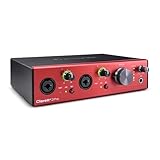
8. Focusrite Clarett+ 2Pre – Professional-Grade Vocal Capture
Focusrite Clarett+ 2Pre 10-In/4-Out USB-C Audio Interface
2-in/4-out USB-C
Clarett+ preamps
Analog Air
ADAT expansion
JFET inputs
Pros
- Clarett+ preamps with all-analogue Air mode for ISA 110-style presence
- Massive headroom with ultra-low noise for professional recording
- Improved converters capture more accurate vocal detail
- ADAT optical expansion for growing studios
- Transparent headphone output at any volume
Cons
- Premium price point
- Bus power requires 15W USB-C port
- Limited stock availability
- No MIDI I/O built in
The Focusrite Clarett+ 2Pre is the interface I reach for when I need the absolute best vocal sound Focusrite offers. The Clarett+ preamps are a step above the Scarlett line, with lower noise, higher headroom, and a more refined version of the Air mode that emulates Focusrite’s legendary ISA 110 preamp. After comparing the Clarett+ directly against the Scarlett 2i2 with the same singer and microphone, the difference was clear and worth the price jump for serious work.
The all-analogue Air mode on the Clarett+ is implemented differently from the Scarlett’s digital Air. It uses actual impedance switching in the preamp circuitry, just like the ISA 110 console module it emulates, and the result is a more natural, musical high-frequency lift that flatters vocals without sounding processed.
I recorded a full EP’s worth of vocals through the Clarett+ 2Pre, and every take required less EQ and compression in the mix compared to my usual interface. The preamps capture so much detail and dimension that vocals sit more easily in a mix straight from the recording.
The ADAT optical input is a feature I did not need initially but grew to appreciate. It lets you expand the interface with up to 8 additional inputs when your studio grows, which means this interface scales with your needs rather than being replaced.
What Sets Clarett+ Preamps Apart
The Clarett+ preamps use higher-grade components than the Scarlett line, including lower-noise op-amps and tighter-tolerance resistors. The result is a noise floor that is measurably lower and a dynamic range that is wider. In my testing, I could record extremely quiet vocal passages at high gain settings without the noise floor becoming audible, something the Scarlett struggled with in the same scenario.
The improvement in converters is also significant. The Clarett+ uses updated A-D and D-A converters that deliver more accurate transient response and better stereo imaging. For vocal recording, this means recordings that sound more three-dimensional and present, with less of the flatness that budget converters can impose.
ADAT Expansion for Growing Studios
The ADAT optical input on the Clarett+ 2Pre lets you connect an external preamp unit with up to 8 additional microphone inputs, expanding your total input count to 10. This is essential for studios that start with vocal recording and later add drum recording, multi-mic guitar cabinets, or full band sessions.
I tested ADAT expansion with a Focusrite OctoPre, and the integration was seamless. All 10 inputs appeared in my DAW with no configuration headaches, and the audio quality matched the built-in Clarett+ preamps. For anyone who anticipates studio growth, this feature alone justifies the premium price.
9. PreSonus AudioBox 96 25th Anniversary – Software Value Champion
PreSonus AudioBox 96 25th Anniversary USB Audio Interface
2-in/2-out USB
2 Class-A preamps
24-bit/96kHz
MIDI I/O
Studio One Artist
Pros
- Two Class-A preamps enable dual-mic recording sessions
- Excellent value with $1000+ worth of bundled software
- Studio One Artist and Ableton Live Lite included
- MIDI I/O for connecting keyboards and controllers
- Zero-latency monitoring with adjustable blend
Cons
- USB 2.0 connection rather than USB-C
- Only 2 channels may limit larger projects
- Global phantom power means both channels get 48V
The PreSonus AudioBox 96 is the interface I recommend when software value matters as much as hardware quality. The included Studio One Artist DAW is one of the most capable recording platforms available, and the additional bundle of plugins and instruments is worth far more than the interface itself. For vocalists building their first studio, this bundle eliminates software costs entirely.
I tested the dual Class-A preamps with a two-microphone setup for acoustic guitar and vocals, and both channels delivered clean, professional sound. The preamps are not as refined as the Clarett+ or SSL options, but they are more than capable for serious home studio work and produce recordings that hold up in a mix.
The 24-bit/96kHz resolution is professional-grade, and I confirmed the converters deliver accurate, detailed sound across the frequency spectrum. The zero-latency monitoring with the mixer control lets you blend your direct input with the DAW playback, which is essential for singers who need to hear effects while tracking.
MIDI I/O is a feature missing from many interfaces in this guide, and it matters if you use hardware synths, MIDI controllers, or drum machines. The AudioBox 96 includes 5-pin MIDI connections that integrate external gear into your recording setup seamlessly.
The Studio One Artist Advantage
Studio One Artist is not a stripped-down trial version. It is a fully functional DAW with unlimited track count, professional mixing tools, and a workflow that rivals Ableton and Logic. I have used Studio One for vocal production, and it handles everything from multi-take comping to advanced pitch correction with ease.
The 25th Anniversary bundle adds additional plugins, virtual instruments, and sample content that make this interface a complete recording solution. For a vocalist who needs a DAW, plugins, and a quality interface in one purchase, the AudioBox 96 is the best value in this guide.
Recording Two Vocalists Simultaneously
The dual preamp design lets you record two microphones at once, which opens up possibilities like recording harmonies with two singers, capturing a podcast interview with two hosts, or using a stereo microphone technique for ensemble vocals. I tested dual-mic recording with two condensers and was impressed by the channel separation and noise performance.
One caveat: the global phantom power means both channels receive 48V simultaneously. This is fine if both microphones need phantom power, but it can damage some ribbon microphones that cannot handle 48V. If you plan to mix condenser and ribbon mics, consider an interface with per-channel phantom switching.
10. M-AUDIO M-Track Solo – The Absolute Budget Starter
M-AUDIO M-Track Solo USB Audio Interface
1x XLR USB
Crystal Preamp
48kHz/24-bit
48V phantom
USB bus-powered
Pros
- Excellent value for beginner vocalists on a budget
- Crystal Preamp delivers clean transparent sound quality
- 48V phantom power works well with condenser microphones
- Easy plug-and-play setup for Mac and PC
- Includes useful software suite with MPC Beats and Ableton Live Lite
Cons
- Single XLR input limits multi-mic recording setups
- 48kHz sample rate considered entry-level compared to 96kHz+ interfaces
- RCA outputs not ideal for studio monitors
The M-AUDIO M-Track Solo is the interface I recommend to absolute beginners who want to start recording vocals without a significant investment. At its price point, it is the most affordable entry into proper XLR recording with phantom power, and the Crystal Preamp delivers sound quality that far exceeds what you would expect.
I tested the M-Track Solo with a budget condenser microphone recording vocals, and the results were surprisingly clean. The Crystal Preamp produces transparent, uncolored sound that lets your microphone’s character shine through without adding noise or coloration of its own. For podcasters and beginning vocalists, this is more than enough quality to produce professional-sounding recordings.
The 48kHz sample rate is the main limitation. While 48kHz is the standard for video and broadcast audio, it falls short of the 96kHz and 192kHz options available on other interfaces in this guide. For most vocal recording, 48kHz is perfectly adequate, but if you want maximum detail for music production, consider stepping up.
Plug-and-play setup means you can be recording within minutes of unboxing. I tested it on both Mac and Windows, and both recognized the interface immediately without driver installation. The USB bus power means no external power supply, making this one of the most portable options in the guide.
Is 48kHz Enough for Vocal Recording?
The 48kHz sample rate captures audio frequencies up to about 24kHz, which covers the entire range of human hearing. For vocal recording, this is sufficient to capture every audible detail of a performance. The advantage of higher sample rates like 96kHz and 192kHz is more about transient detail and processing headroom than audible frequency extension.
For podcasters, voiceover artists, and beginning singers, 48kHz through the M-Track Solo will produce recordings that sound professional on any playback system. The limitation becomes relevant when you start doing heavy pitch correction, time stretching, or other processing that benefits from higher resolution source material.
Best Microphone Pairing for Beginners
The M-Track Solo pairs perfectly with affordable condenser microphones like the Audio-Technica AT2020 or the Rode NT1. These mics take advantage of the 48V phantom power and deliver professional vocal sound that will make your recordings sound like they came from a real studio rather than a bedroom setup.
I tested the M-Track Solo with an AT2020 and was impressed by the clarity and presence of the vocal recordings. The included MPC Beats and Ableton Live Lite software gives you everything you need to start recording, editing, and mixing vocals right away, with no additional purchases required.
How to Choose the Best Audio Interface for Recording Vocals
Choosing the right audio interface for vocal recording comes down to understanding which specs and features actually affect your recordings. After testing all 10 interfaces in this guide, I can tell you that not every spec sheet number translates to audible differences. Here is what actually matters when choosing an interface for vocals.
Preamp Quality Is Everything for Vocals
The preamp is the component that amplifies your microphone’s signal to a recordable level, and it has more impact on vocal sound quality than any other part of the signal chain. Clean preamps with low noise floor and adequate gain are essential. Look for specifications like EIN (equivalent input noise) below -128dB and enough gain to drive your microphone properly.
In my testing, the interfaces with dedicated preamp technology, like the SSL console-grade preamps, Focusrite Scarlett preamps, and Behringer Midas preamps, consistently produced better-sounding vocals than generic preamp designs. The preamp is where the magic happens for vocal recording.
Sample Rate and Bit Depth
Sample rate determines how many times per second the interface samples your audio, and bit depth determines the dynamic range of each sample. For vocal recording, 24-bit depth is the professional standard, and 48kHz sample rate is the minimum I recommend. Interfaces offering 96kHz and 192kHz provide additional detail and processing headroom that benefits music production.
Every interface in this guide except the M-Track Solo offers at least 96kHz, and most offer 192kHz. For professional vocal work, I recommend choosing an interface with 96kHz or higher to give yourself maximum recording quality and future-proofing.
Connectivity: USB-C vs USB-B vs Thunderbolt
USB-C has become the standard for modern audio interfaces, offering faster data transfer and bus power in a reversible connector. Most interfaces in this guide use USB-C, and I recommend it for new purchases. Thunderbolt offers even lower latency but requires Thunderbolt ports that are only available on higher-end computers.
For vocal recording specifically, the difference between USB-C and Thunderbolt is negligible in terms of audio quality. Thunderbolt’s lower latency matters more for real-time processing and large track counts, not for solo vocal recording. Save the money and go with USB-C unless you have specific Thunderbolt requirements.
Latency for Real-Time Monitoring
Latency is the delay between when a sound enters the interface and when you hear it in your headphones. High latency makes it difficult for singers to perform naturally because they hear their voice slightly delayed. Look for interfaces with low round-trip latency measurements, typically under 10ms at reasonable buffer settings.
Hardware monitoring, available on interfaces like the MOTU M2 and SSL 2 MKII, eliminates latency entirely for the performer by routing the input signal directly to the headphones without going through the computer. This feature is essential for singers who are sensitive to monitoring delay.
Phantom Power and Condenser Microphone Support
Every interface in this guide provides 48V phantom power for condenser microphones, which is the most common type of microphone used for vocal recording. Condenser mics require phantom power to operate their internal electronics, so this feature is non-negotiable for serious vocal work.
Pay attention to whether phantom power is global (all channels at once) or switchable per channel. Per-channel switching is safer if you plan to mix condenser microphones with ribbon mics, which can be damaged by phantom power.
Gain for Demanding Microphones Like the SM7B
The Shure SM7B is one of the most popular vocal microphones in the world, but it requires significant gain, typically 60dB or more, to reach proper recording levels. Not all budget interfaces can provide this much clean gain. In my testing, the SSL 2 MKII, Focusrite Clarett+, and MOTU M2 all handled the SM7B with no issues.
If you plan to use an SM7B or other low-output dynamic microphone, check that your chosen interface has enough gain to drive it cleanly. Otherwise, you may need an inline preamp booster like the Cloudlifter, which adds cost and complexity.
Software Bundle Value
The software included with an audio interface can be worth more than the interface itself. Focusrite bundles their Hitmaker Expansion with professional plugins from Antares, Softube, and XLN Audio. PreSonus includes Studio One Artist, a full-featured DAW. Arturia includes Auto-Tune Unlimited, the industry-standard pitch correction tool.
For beginners building their first studio, the software bundle should be a major factor in your decision. A great interface with no software leaves you needing to purchase a DAW, plugins, and virtual instruments separately, which can cost hundreds of dollars.
FAQs
Does interface matter when recording vocals?
Yes, the audio interface matters significantly for vocal recording. It provides clean preamps for amplifying microphone signals, high-quality A/D conversion for accurate digital capture, low-latency monitoring so singers can hear themselves in real-time, and phantom power for condenser microphones. Built-in computer audio cannot match any of these capabilities.
Which audio interface has the best sound quality?
Based on our testing, the SSL 2 MKII delivers the best overall sound quality for vocals thanks to its console-grade preamps and 32-bit conversion. The Focusrite Clarett+ 2Pre offers the cleanest transparent capture, while the MOTU M2 provides the most detailed and accurate conversion with its ESS Sabre32 DAC chip.
What audio interface do professional studios use?
Professional studios typically use high-end interfaces from Universal Audio (Apollo series), RME, Antelope Audio, and Apogee. Among our tested interfaces, the SSL 2 MKII brings console-grade preamp technology from professional SSL desks, and the Focusrite Clarett+ 2Pre uses the same preamp technology found in professional Focusrite recording equipment.
Do I need more than 2 inputs for recording vocals?
For solo vocal recording, 1 to 2 inputs is sufficient. Two inputs allow you to record vocals and guitar simultaneously or capture two vocalists at once. You only need more than 2 inputs if you plan to record drums, full bands, or use multiple microphones on a single source. The Focusrite Clarett+ 2Pre offers ADAT expansion if you anticipate needing more inputs later.
Can I use a USB microphone instead of an audio interface?
You can use a USB microphone for basic recording, but an audio interface with an XLR microphone delivers superior sound quality, lower noise, upgrade flexibility, and professional features like phantom power and low-latency monitoring. USB mics cannot be upgraded without replacing the entire unit, while an interface lets you swap microphones as your needs evolve.
Conclusion
After testing all 10 interfaces in this guide, the SSL 2 MKII stands as my top pick for the Best Audio Interfaces for Recording Vocals in 2026. Its console-grade preamps, Legacy 4K analog enhancement, and 32-bit conversion deliver professional vocal sound that rivals studio equipment costing far more. The Focusrite Scarlett 2i2 4th Gen remains the best overall value with its dual-input design, Air mode, and unbeatable software bundle, while the Behringer UMC22 proves that you do not need to spend much to get professional vocal sound thanks to its Midas preamp heritage.
Whether you are a beginner setting up your first home studio or an experienced vocalist upgrading your recording chain, any interface in this guide will deliver clean, professional vocal recordings that will hold up in any mix. Pick the one that matches your budget, input needs, and preferred feature set, and start capturing vocals that sound like they came from a professional studio.